walk on by.

Mar. 8th, 2024 11:26 am
angelapleasant: (Default)

 
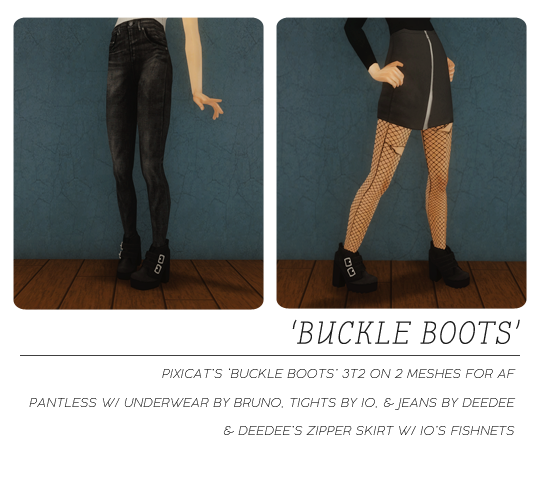
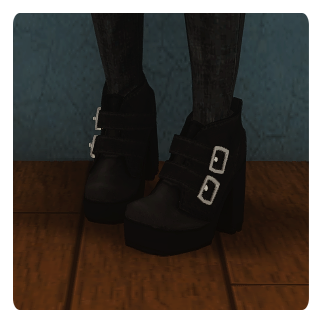
pixicat's buckle boots 3t2. this was actually deceptively hard for me so they aren't 100% perfect. it's been in the folder since december and i honestly don't want to look at it anymore LOL. i did my best with the ankle bones but i honestly don't know what more i can do without distortion so i think they are just fine. i searched for a conversion but i couldn't find one, so hope i'm not stepping on anyone's toes.

they are on a pantless mesh (smoothed buttcrack normals so skintight pant recolors aren't vacuum sealed haha) using deedee's skinny jeans texture (light, medium, dark, and black versions), a recolor with thick black tights by io, and one with underwear by bruno. the non-underwear version are outerwear too.

they are also on deedee's zipper skirt, with io's fishnets (pulled from a default by rudhira). i loved this skirt as soon deedee released it but i wanted a spiced up version too.
 
CREDITS
DROPBOX // SFS
angelapleasant: (Default)

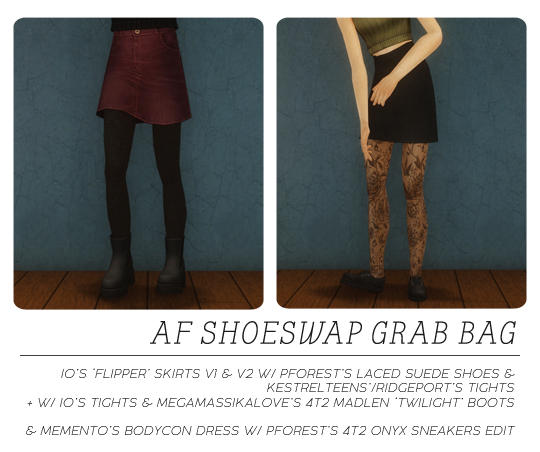
some shoeswaps that have been sitting in my folder forever waiting for me to get them together and preview them. 

io's flipper skirts v1 an v2 textures with the tights from here and pforest's suede sneakers categorized as everyday, and then i also did a version with these 4t2 madlen boots and io's tights as everyday and outerwear separates. only for AF. thinking about doing the TF version was putting me off posting because i really just didn't feel like it, and i only did these for angela as AF anyway. teens can wear the original converse still lol.

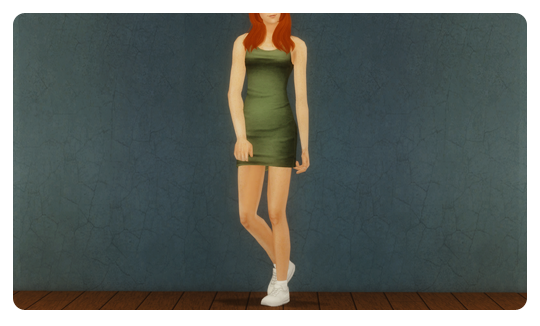
also, memento's bodycon dress with these sneakers from pforest. i felt like it looked kinda sporty so it's categorized as everyday and gym.
 
CREDITS
 
flipper: DROPBOX // SFS
bodycon: DROPBOX // SFS

angelapleasant: (Default)
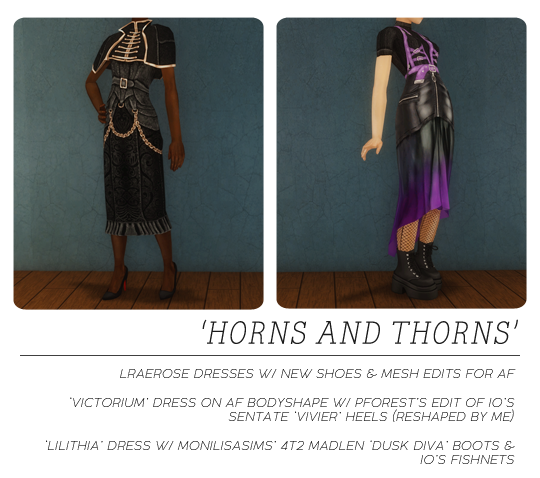
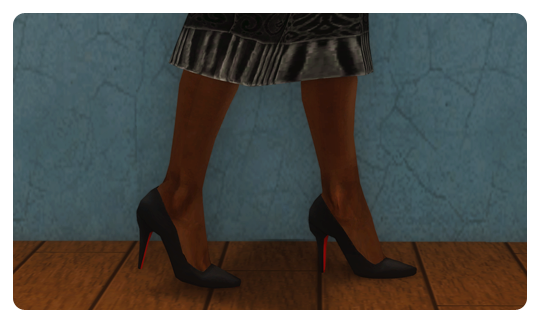
lraerose's textures are so beautiful??? i wanted the victorium dress for my younger ladies in the AF bodyshape, i took the bracelets off so you can pick your own, and i went ahead and changed the shoes as well because i don't like the maxis feet shape. i tried to keep the ankle straps because they were perfect, but unfortunately i'm not that talented, lol. so instead, you get a newly edited shoe! these are io's converted sentate heels, which were then edited by pforest to fix the mapping of the skin, but their edit made the heels more rounded. i wanted severe, pointy heels, so i edited the shape of pforest's edit back to pointy LOL. i did the best i could getting them close to their original shape! 

the victorium dress is only for AF/YF, categorized as formal. if you want an updated mesh for the elder recolors, pforest made a default of the elder stole dress mesh with a nicer shape.

i also shoeswapped the lilithia dress. i put monilisa's conversion of madlen's dusk diva boots on them, and added io's fishnets (pulled from a default by rudhira). 

UPDATE 4.25.24: fixed a uv map issue on one of the heels, and edited the shoe shape a little bit to fix some clipping with the feet. the heels should no longer clip into the feet unless the sim is doing some pretty extreme poses (no ballet in these heels lol). download links have been updated, but if you have already downloaded, you only need to replace the mesh for the victorium dress!
 
CREDITS
 
DROPBOX // SFS
angelapleasant: (Default)


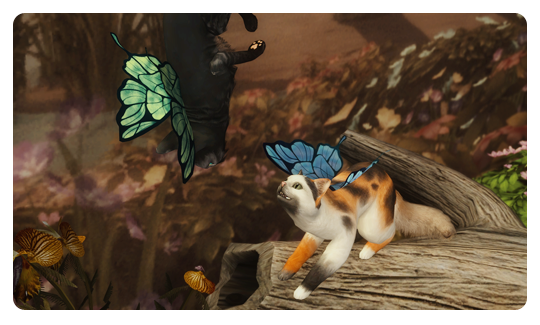
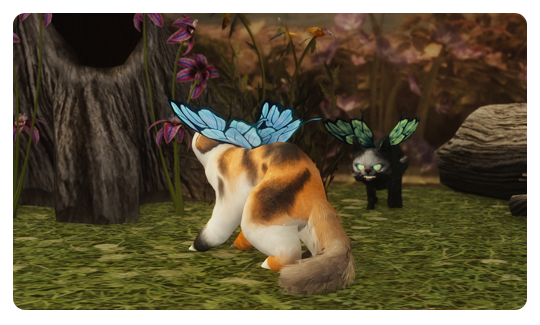
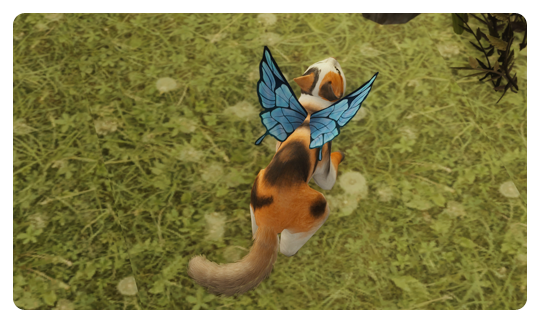
something for the gos theme! here are gryning's butterfly wings as cat collar accessories. you can easily recolor them by following this mts tutorial (but you will clone the blue wings recolor, not the collar package in the tutorial). they come in 5 colors (original blue, and green, pink, orange, and grey using furbyq actions).

i'm going to do a pet accessory tutorial video at some point, since it's actually a lot easier than it seems, but you have to understand a few separate tutorials to do it.
 
 
CREDITS


angelapleasant: (Default)
okay so i promised i would make this tutorial for someone, so i thought i would go ahead and set it up for everyone. there are a lot of shoe swap tutorials out there but everyone learns differently so here is mine. i've linked the meshes i'm using because if you are a complete beginner, i think it would be easiest to use the same meshes so you can do exactly what i'm doing. i've tried to explain everything as i go assuming you know nothing about making cc except how to export and import in bodyshop. if you have questions i'm happy to help. it's really easy once you get confident with it.

1. first you will want to make sure you have simpe set up: simpe (SimPe_075f_qa.7z); this version doesn't have the pinups lmao. if you get an xml error about the hoods, go here and download it from post #5 and install where it says. if you already have simpe obviously you can use that version! 

2. next you want milkshape 1.8.5. it looks like it's no longer actively being supported, so here is info on how to register.

3. then you want all of these plugins (they go in your milkshape folder in program files or wherever you installed it):
weshowe's unimesh plugins
weshowe's autojoint
cat's normal smoother
cat's uv flip
cat's uv data merge cat's mesh mirror
tsrw plugins
we won't use all of them for this tutorial but they are good to have and i don't want to list them again for the next one lol.

4. you also want nvidia dds utilities for texturing via simpe, which is the best way to do it because importing via bodyshop gives you lower quality textures. you can do it 2 ways, via build dxt which i will show you in the video, or my preferred way if i'm going to be editing the texture (example: if i'm doing recolors with color actions), which will be at the end of this post.

5. you will also want these programs (again, we won't use all of them here, but they are handy to have and will be used in future tutorials: 
cmar's mesh toolkit
filename tooltipper (post #83 for working link)
compressorizer
bulk rename utility
wardrobe wrangler
outfit organizer

6. last, grab lifa's wso templates because for the next tutorial sometime in february i'm going to go over how to make morphs/ conversions with them. 

before you watch the video, please take a look through deedee's post on milkshape for beginners, because it will help you a lot. i try to explain all the things i'm doing but some of it is just second nature, so having this to refer to, and having the base knowledge beforehand, will help a lot.

for this tutorial, we're going to be putting these boots (sentate's cordelia boots converted by digitalangels, made pantless by deedee) on this skirt (tristana v2 by io). so go ahead and download those, make a project folder on your desktop or somewhere easy to find so your project is neat, put them in there, then load up simpe, open milkshape, your photo editing program, and once simpe is open you can load bodyshop and follow along while that loads.

i apologize for my voice, it's too cold for me right now, i'm congested and scratchy, and nothing is more humbling than hearing yourself recorded. i've also never recorded anything like this before, so a lot of ummmms and awkwardness haha. also i curse once or twice because i have a dirty mouth and let a few slip. also yes i am using a super old version of photoshop, i don't like to update things unless i have to because i'm used to this version LOL, also i'm not paying a subscription for something you used to be able to pay once for so my ancient version stays.


if you need to recategorize something after, the outfit organizer i linked is what you want. the download page for that is really good at explaining how to use it, so i'm not going to reinvent the wheel with that.

but here's a quick tutorial on how to make your dds in photoshop like i was talking about (your version is probably newer than mine and may look different):

1. the best way to get the full texture of something is to export the textures in bodyshop, and then go to the projects folder in your sims 2 documents folder (where you would normally edit if texturing via bodyshop). i open the alpha and the texture of the group that i want.
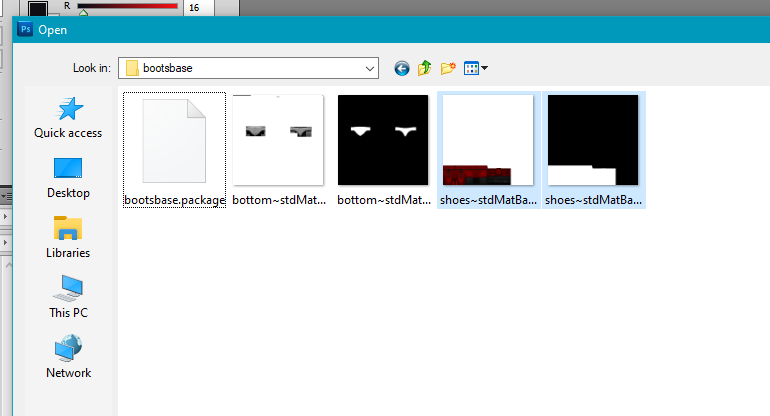


2. then i'm going to select all on the alpha, and copy. 
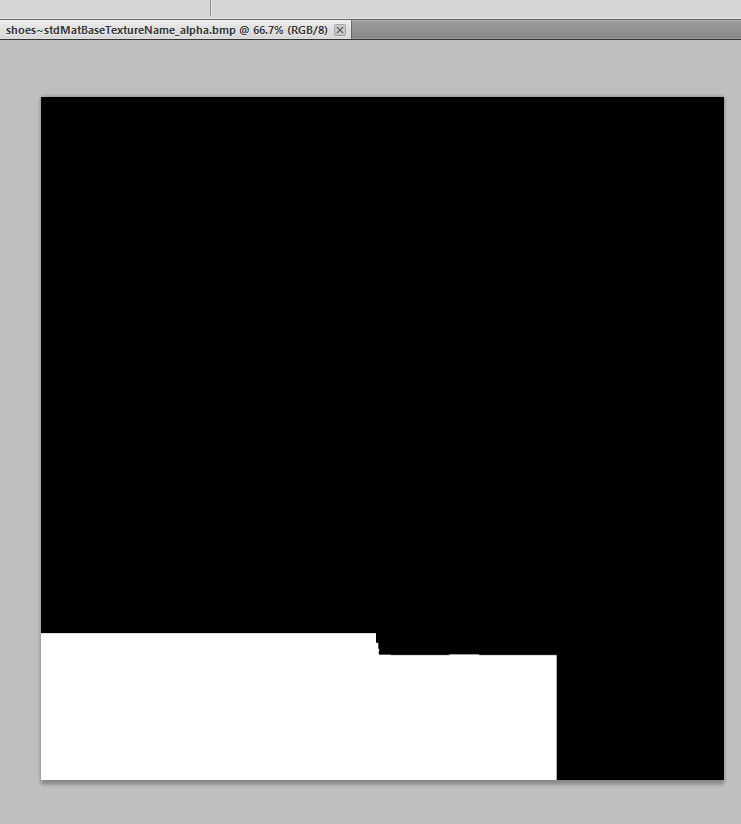
 

 3. after that i'm going to switch over to the texture image, and go to channels.
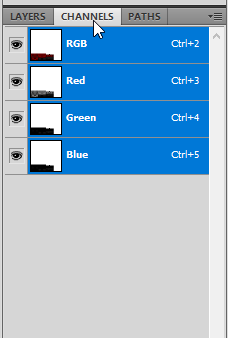
 

4. at the bottom of channels, i'm going to select create new channel, and it's going to create an alpha channel.
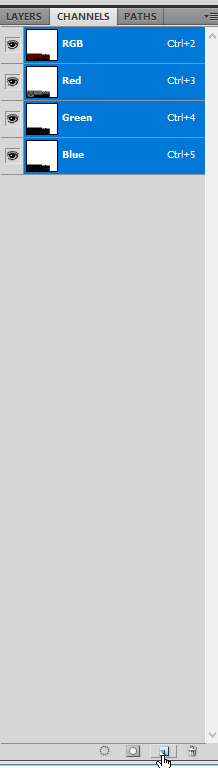
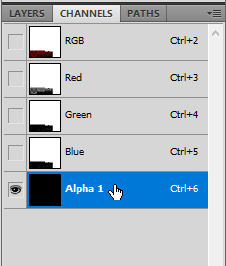

5. i'm going to make sure the alpha channel is selected, then i'm going to paste the alpha that i copied from the alpha image into the alpha channel that i created on the texture image.
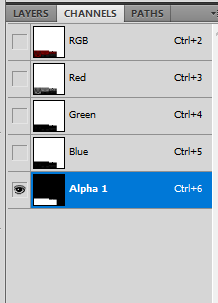


6. after that, i'm going to select the rgb channel and go back into layers so i can do whatever i want to the texture and the only parts that will show up when i save it are the white parts of the alpha, just like when you import via bodyshop.
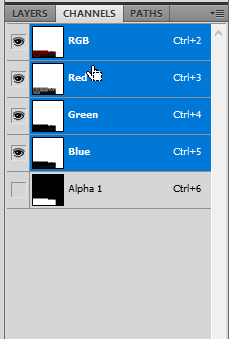
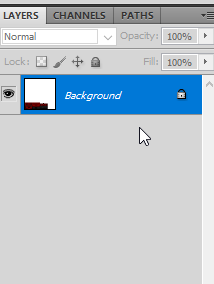


7. at this point, i usually save this as my psd if it's my base image that i'm going to run color actions over. that way i can do the following steps for each recolor, instead of editing and recompressing a .dds (each time you save a .dds, you are compressing it, so if possible, you want to export your textures from something that hasn't been reimported too many times because the game and simpe are compressing the files too if you import via bodyshop/ build dxt. example: if i wanted to edit a dress that had been shoeswapped, the best thing to do would get the textures from the original dress. if the textures don't look degraded, you don't have to go through all that effort, but for darker textures that have a lot of funkiness, it can help).

8. once i'm ready to save a recolor as a dds, i go to file / save as or use the keyboard shortcut, and select dds as my file format. make sure alpha channels is checked, or you will lose your alpha info and have to paste it in again. 
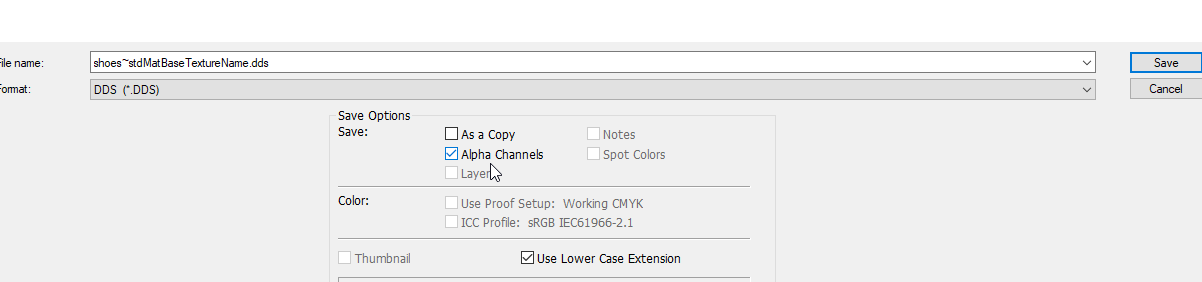
 
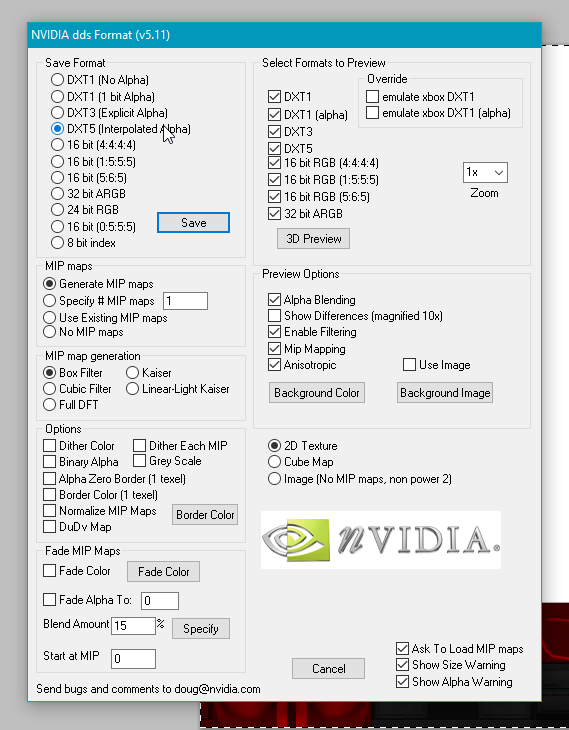
9. then something like this will pop up (this also requires the dds utilities i linked), and you will select dxt5 and save. i don't change any of the other settings. you can do any recolors (objects too for example) this way. then back in simpe, you will just click import dds instead of build dxt (because you've already "built" it in photoshop). i prefer this because it's less clicking than build dxt and goes faster lol. and either way is better than bodyshop, because you have control over the way your image is imported. 

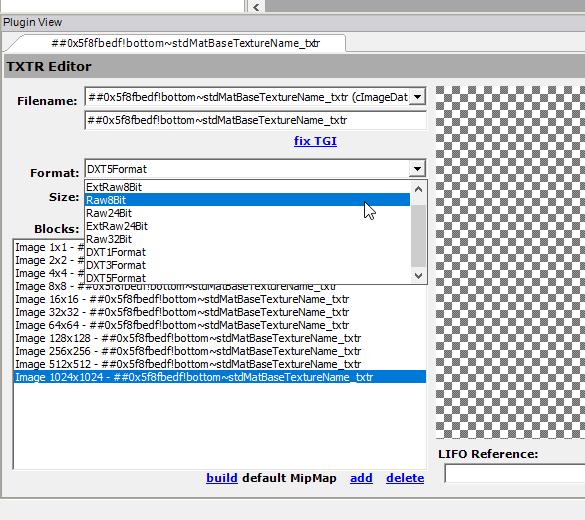
if your mesh has a normal map (this is the grey texture called a bump map in ts2 tutorials and the texture file has the word normal in the name in simpe), make sure in plugin view in simpe, you change the type to raw8bit after importing it, and click commit. otherwise, it's going to make your whole thing look wrong. 
i know skell's tutorial on normal maps says to just delete them, but i leave them if there already is one and i didn't edit the texture. if you did edit the texture (example: you alpha edited the shirt to change the neckline or something like that) you need to make sure the normal map reflects those changes too, because otherwise it's going to put shadows/ 3d effects where they don't belong on your mesh. if you just want to delete them, skell's tutorial tells you how (it's easy). also, make sure you put the edited normal map in your base recolor after you edited it and linked it to your mesh, before you load back up bodyshop to do your recolors. that way, when you're recoloring the one mesh, the fixed normal map is already in it, and you don't have to import it again (bodyshop can import those fine lol). if you're going to delete it, also do it before you reload up bodyshop to recolor it, because the recolors won't have a normal map and you don't have to do the deletion process again.
angelapleasant: (Default)
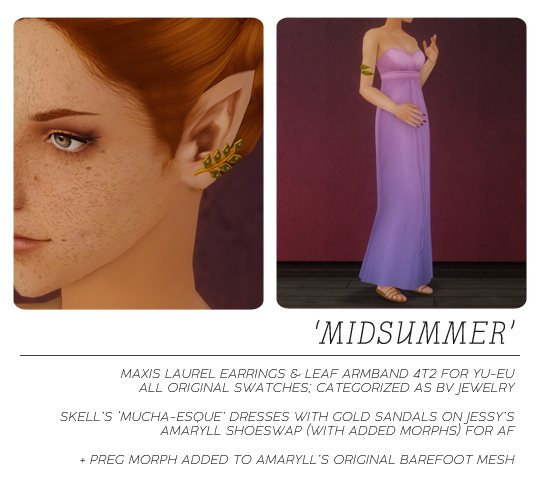
here's a basic shoeswap of this dress by skell because i never use it since it's barefoot.

it's on jessy's 'what the water gave me' mesh, which did not have morphs. i added the morphs, so make sure you don't have my edited mesh and jessy's in your game at the same time because they can conflict and cause crashing.

i also added a preg morph to amaryll's mesh that comes with skell's download, because i think the dress suits it. again, don't keep both versions of the mesh.

i also converted some earrings and an armband from ts4, to practice doing accessories. they are BV jewelry, the earrings are in one of the earrings categories, and the armband is in right bracelets. should work for YU-EU, but you may have to use an earlobe slider for the earrings to be placed where you want them as they don't move with the sim (i couldn't do it without it distorting them).
 
CREDITS
skell
amaryll
jessy
 
DROPBOX // SFS
angelapleasant: (Default)
now for the REAL reason i learned to make accessories: so guardian can be in his final form!
but don't worry, the his little lantern isn't to lure you to your doom, it's to light your path out of the dark places.


you can recolor this following these instructions, but clone my "guardian" RECOLOR, not the mesh, instead of their package. i only made 2 colors (black with a white forehead end for guardian, and just plain black). also since i couldn't do 2 groups for this, the lure is only one so the whole thing "glows" via the tmxt. idk how the part that isn't supposed to be lit will look in lighter colors. i couldn't have made this without deedee's help!

you can get guardian and his eyes here! he is supposed to be kind of like a lykoi cat but with a big scraggly longhaired tail.

CREDITS
abufi


DROPBOX // SFS
angelapleasant: (Default)
 
welcome to our collab!!! bayoubashsims found this set of fins and lure by abufi and we both wanted anglerfish, so here we are! i learned how to make accessories for this LOL. i converted the meshes and bayoubashsims made the textures. they come in 8 colors and you can choose EITHER accessory OR BV jewelry. the BV jewelry will stay on in the shower and they are in the misc section with the facial piercings. they are for all ages and genders! you can't have both versions in your game because they use the same files.


you get angler lures that glow in the dark, spined back fins, and spined head fins:


CREDITS:


◊ abufi (fins and lures)
◊ nova l (textures)
◊ colors by alfredaskew & furbyq
 
CHOOSE: 

as accessories: DROPBOX SFS
OR as jewelry (recommended):
 DROPBOX  SFS


BONUS!!!

UPDATE: 2/19/24: epi fixed the seams on these and edited the mod file to use the same textures for male and female, so now the file is smaller. you can find their version here, but my files have been updated with the new textures/ mod base in case you wanted the old hair/ scale color combos, as epi's are different. tysm epi!


i used the tattooer to convert weepingsimmer's nenps fish scales to put on midge's mermaid overlay for their lifestate. there are some noticeable seams on this HOWEVER they don't bother me because i will just edit them in screenshots. i made this for personal use but i'm sharing in case anyone wants them. the seams will probably bother you! if they do and you want to fix them, here are the textures all ready to go so you can get the highest quality version. bc i'm not gonna fix them lol. the face scales are matching layerable blushes. the fins and tops are from almighty_hat for all ages but toddler, genders, and even androgyny shape.


DROPBOX  SFS
angelapleasant: (Default)


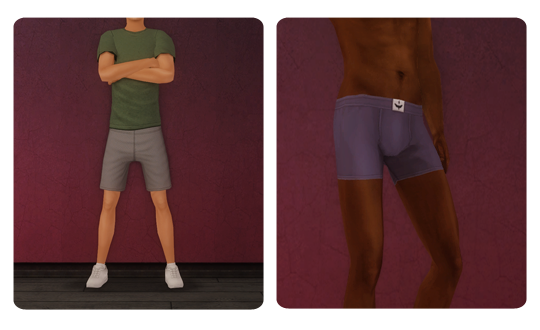
something for the boys finally. i find that i have almost NO athletic wear for them (also why do i have outfits with jeans in my athletic category???) i liked the shorts on these by needlecream, so i put some more athletic shoes on them (pforest's edit of these), made 5 solid recolors to give your boring sims (*cough TANK cough*) some more variety, and converted for teen as well. also, the AM files are enabled for EM. also i closed the transparencies between the shirt and shorts where the meshes weren't connected.

also i wanted to try the tattooer, so i converted some boxer briefs by sentate. i did them in 20 colors by curiousb for TM and AM, and they are also enabled as PJs. these are SEPARATES, so you will need lazyduchess' separates for all mod because i didn't enable them for everyday. i included a naked top for TM and AM categorized as every day, pjs, swimwear, athletic, and underwear for your separates use. 

if you don't like separates, the "swatch" folder is just the png textures so you can easily create a bunch of packages in bodyshop and then import them in simpe. 

and that's all folks! might do this again next year instead of an advent calendar, because i'm too busy before xmas and this way daily treats get to go on for longer :)

UPDATE 10/30/25: poeticallydifferent on tumblr pointed out to me the legs looked a little funky on the TM mesh from me just tossing it in the auto converter and letting it go haha. it's fixed now! i also smoothed the TM fat morph out a little. they are defaulting the meshes so keep an eye out for them! download links have been updated but here is just the fixed TM mesh! and thanks to them for testing the mesh when i had to send like 4 versions cause i forgot how i converted it and hadn't touched making stuff for so long i forgot steps LOL. FIXED TM MESH ONLY: SFS

CREDITS
 
DROPBOX SFS
angelapleasant: (Default)


here's a set of basic shoeswaps for AF. i love these slingbacks by bunhead and i think they're perfect for businesswear. i edited the shape a bit to be similar to io's edit of bunhead's pointed heels (like on her tristana skirt v2)

most of these outfits/ bottoms had loafers, some had sentates lilith pumps or t-bars. i think sentate makes some of the best content we have but i prefer pointier heels to chunky, and i just don't want t-bars with everything LOL. so this was born. 

included are sentate's lilith trousers and some of skell's recolors (i left out the colors i didn't feel i would ever use), trapping's separated version of sentate's 'bella hostess' skirt in original black, io's edit of memento's pantsuit, deedee's io/AL bottom only dress mashup, aweeshie's recolors of the AL dress, and tomwood1906's edit the maxis garden club suit. numbered texture pngs are left in each folder as swatches so you can easily delete. that will bring the folder size down considerably so make sure you delete those images before putting in your game.

i like these blazers by skell if you need any business-like tops!

CREDITS
 
DROPBOX SFS
angelapleasant: (Default)


here are some edits of deedee's sparkle wedding because i love the top. first is a shortened version with io's 4t2 sentate heels (as usual lol). comes in 8 colors, no swatch but they are labeled by color. red-black is a red top/ black belt/ black skirt. 

second is a mashup with trapping's 3t2 jumpsuit (i think this is it) and pforest's edit of trapping's heeled sandals. 9 recolors, red-black is the same red top/ black bottom, and navy-white is all navy with a white belt.

enabled for EF because it's a structured top. i eliminated 99.9% of the clipping on the skirt, but for some reason this was way more challenging than it was supposed to be. every once in a while you may see like 3 pixels of leg while they walk. i'm not fighting this anymore lmao. that's also why you don't get a TF version bc i'm tired of looking at it lol.

the skirt and top psds included are deedee's. 

UPDATE 4.25.24: changed the heels from io's original conversion to my edit of pforest's edit so that they have correct mapping on the ankles (no more ankle seam, and you get your skin's ankle detaling). these heels may clip slightly with the feet in more extreme poses but i did my best to ensure they look right 99% of the time. download links have been updated, but if you have already downloaded, you only need to replace the mesh for the cocktail dress!

CREDITS
deedee
lace
trapping
io
sentate
pforest

 
DROPBOX SFS
angelapleasant: (Default)


40 recolors (actions by furbyq, alfredaskew, and aelia) of nabila's edit of bruno's 'dazzledust' eyeshadow (sims graveyard link, 'hypertronic superstar'), but i blended the alpha with tea-leaf's 'santa fe' eyeshadow alpha to make more colors work better on more skintones as well as to keep it from going up past the eyebrow. the swatch is out of order (the individual ones in the .rar are not, so please reference those if deleting outside of bodyshop).

CREDITS
 
DROPBOX SFS
angelapleasant: (Default)


the last lipset for a bit (lol). these use a base by bruno that came with one of their sims, and i kept the alpha because i liked how it gave a sort of plumped/ lined effect. i also blended some lips by nymphy (these or these, not sure which), the maxis sioux texture, and it uses io's skin as a background because i didn't like the base the bruno lips were on. the usual 40 colors plus 4 by aelia because i thought the texture suited darker colors best. you can find all my lip psds in this folder.

CREDITS
bruno
nymphy
io
trapping
aelia

 
DROPBOX SFS
angelapleasant: (Default)


happy new year! here's an extra treat for new year's, unrelated to the 12 days of xmas :)

i looked into converting sentate's beautiful new flavia dress, but i ended up just making 4 different versions using the textures on different meshes instead.

first mesh is deedee's halima conversion (originally by ice-creamforbreakfast), remapped to fit the textures. this is the most similar mesh to sentate's original. 

second is a shortened version of this, with memento's conversion of madlen's febris heels. every dress has black shoes, but included all the shoe textures from platinumaspiration's recolors and the shoes are NOT repo'd so you can easily import whichever shoe color you want into simpe if you want something other than black.

third is a one shoulder version on deedee's josephine mesh, remapped to fit the textures.

fourth is a shorter version of the josephine dress, with some sequin booties. i couldn't find any for ts2 that i liked for this dress, so i edited the shoes from nouk's knee boots (i'm calling them the 1989 boots since they were inspired by the ones from that set of the eras tour). some dresses in this set have matching boots, one of the reds has gold, and the rest have silver or white. i included the booties textures too for easy import into simpe if you want to change the color of the shoes for a particular recolor.


all dresses are repositoried to a master texture file so you only have one set of dress textures in your game!

which brings me to my next point... i also included the XML files for the dresses, so if you want to age/ gender convert, or put the textures on another mesh that has appropriate mapping, you can just use the XML file to repository them to this master texture file and include it with your download. this set comes in all 35 of sentate's colors, and the swatches are in the XMLs folder for easy deletion (the swatch numbers correspond to the XML file names for creators).

i also included the dress textures in dds format so you can just directly import them into simpe at the highest quality if you need them for something and don't want to repo it/ do the whole set. 

CREDITS

 
DROPBOX SFS
angelapleasant: (Default)


last batch of my eyes folder on this sclera by alfredaskew plus another bruno eye someone asked for. 
 

all eye files use the original packages. so you can't have both versions in the game. gen and town only because that's what i use.

all of the eyes are geneticized by the original creators. except bruno's, and i edited uranium-z's geneticization because they were all set at 1.
 
the original swatches (not by me) are included in the rar. some of them are out of order, so you will need to use bodyshop to delete colors you don't want. same with the default sets; i don't know which swatches i used as i just made them quickly for those who don't like doing their own/ don't know how to do their own, so if you can't stand to have 5 duplicates of the defaults in your custom section, sorry 😅

no preview of pooklet's black eyes, because they were a bunch from different sets. for jessi's kiai eyes, i edited the positioning of the iris to match pooklet's edits, because those were the packages i had in my game. i did all of the eyes from the sets they used, so these include pooklet's packages as well as jessi's, trapping's, and romantic roulette's. that's the set i suggest getting if you only want one set in your game, because it's huge. i didn't edit the textures for the others at all except to resclera them.

i realize most of these were already on an animation friendly sclera, however i prefer this one and since i put in the effort to change them for myself (my default set is brick v2) i'm sharing to match the other eyesets i've already put out. i prefer to have a mix of different eyes in my game since no one irl has the same eyes, but i like the sclera to match, lol.

 
CREDITS
◊ virtualpeople, pooklet, jessi, trapping, romantic roulette, tea-leaf, bruno


angelapleasant: (Default)
 
 
lots of hotel clutter i needed for my story. i did ats4's full luggage set (laptop case, trolley case, suitcase, with open, laying, and standing versions-- textures are repositoried to the laying versions). i also did some items from her hotel set, which you can see in chapter two of my story ;) you get the trolley, the key, they keycard, the little bell, the safe, and the door stop. all deco/sculpture for $16. my object guids are randomized.

you also get some linen, tiny circle patterned, and basic "hotel" patterned recolors of these repositoried build your own curtains. meshes included.

i also included 2 clutter items specifically for this chapter, which are the yuxi boots hermia wears as clutter in various positions, and deedee's rachel flannel top (using mdp's separated mesh) positioned to be tossed over an armchair. the mesh is kind of goofy but it works for screenshots and haven't seen much in that vein so i'm sharing it in case someone can use it. comes with recolors by pforest, deedee, mdp.

everything is in a collection for both residential and community which you can get here / alt. icon included in the rar so you know what to look for.

CREDITS
 
DROPBOX SFS
angelapleasant: (Default)


my first set of maxis lip edits was on one of three textures (at least, i think three were only three lol). then i just shared an edit on another one of the textures. these are on the ice texture from ofb (i also think that was used for gvaudoin's lipstick in the bg), blended with bruno's britney lips and alfredaskew's n134 lips, and using pooklet's alpha so everyone can wear all the colors and using the same color actions as usual, mostly by me and the last 8 by trapping. 

the swatch above is only to show the colors. i ended up editing the texture more after making the swatches, and put the lips on a different background/ base. the outer part that isn't blended in the swatches isn't in the visible part of the alpha so don't worry, lol.

i also use skins that have smaller than usual lips drawn on. i don't see a lot of people using these skins, so you are almost guaranteed to have more lip texture (vs facial skin texture) behind the edges of the lipstick than i do, if that makes sense.

i also included defaults for the maxis lips using my 3 maxis lip blends. inside the defaults folder is a list of the metamorphosis and sugarplum lips you can delete if you don't want duplicates of the defaults. the lipblend chosen for each default swatch is whichever one matches the base texture of the original maxis swatch, so you get a mix of each. since there are only a few ice textures, and since they were more dramatic, i made recolors of these lips just for those defaults using furbyq's actions, so you don't need to delete any from this set.

you can also find psds for these and all my previous lipsets here, in desaturated and color versions to run actions over. my actions are also in that folder. the 24 fenty colors need to be used on a light desaturated base, and the 8 huda colors (like the trapping skintones) need to be used on an S1 base. 

CREDITS
 
DROPBOX SFS
angelapleasant: (Default)


someone asked for shady's stay natural eyes on this sclera i've been using, so i picked out a few more sets i wanted to have in my game. these eyes are all gen & town since that's what i use, it's easy to change it in simpe if you don't like it.

these use shady's original files, so you can't have their sclera in your game at the same time. i had to rename them for ease of importing textures, so make sure you remove the old versions if you have them as they won't overwrite. i included shady's original swatches in the packages, but they are not in the order of the packages so you will have to do your deleting in bodyshop. for this reason i don't know which packages are duplicated in the default sets, so again, you will have to delete dupes in bodyshop if it bothers you, lol. i think most people prefer to make their own default sets, but i included just in case someone isn't comfortable doing that.

anon, sorry i made you wait so long, i've been busy 😅

CREDITS
 
DROPBOX SFS
angelapleasant: (Default)
 
 
maxis freetime simple leotards with skirts. they are meant to look like the little wrap around tie skirts, hence the bows, but since i couldn't find a mesh i liked that wrapped around, and i'm not that good at editing textures, they aren't actually wrap skirts. but i think they're still cute.

they come in all of freezerbunny's skintone tights and shoes-- each skintone S1-S5 has a black leotard with a pink skirt, and a pink leotard with a black skirt. each of those leotards has the option of shoes with straps or without. i suggest getting freezerbunny's leotard recolors here so you can have those tights options without the skirts too.

i also included the a recolor of the simple black leotard for S1, using the beige tights and shoes from the pink leotard, since S1 wasn't included in the set because those tights are already light. it comes with and without straps as well.

last, i made defaults of the simple leotard meshes for TF and AF because i noticed a little line on the leg of freezerbunny's recolors where the texture isn't caught in the mapping. rather than have to fix those textures, i just pulled the mapping at that spot over few pixels to catch the tights texture. i also added preg morphs to the meshes. (the skirt versions don't have preg morphs)

this was my first time using mesh toolkit to fix the bones on something (the bow, which i pulled off one of deedee's mashups and moved, to match the skirt, which was also from a separated mesh by deedee). so that's exciting lol

i was going to do a version with leg warmers but sushigal007 has some accessories here!

CREDITS
◊ textures: freezerbunny

 
DROPBOX SFS
angelapleasant: (Default)


my first set of maxis lip edits was on one of three textures (at least, i think three were only three lol). these are on another one of those textures (same base as the 'sioux' color), blended with bruno's britney lips and using pooklet's alpha so everyone can wear all the colors and using the same color actions as usual, mostly by me and the last 8 by trapping. 

CREDITS
bruno
trapping
◊ lilith

 
DROPBOX SFS

profile

angelapleasant: (Default)
lissie

we are restless things